
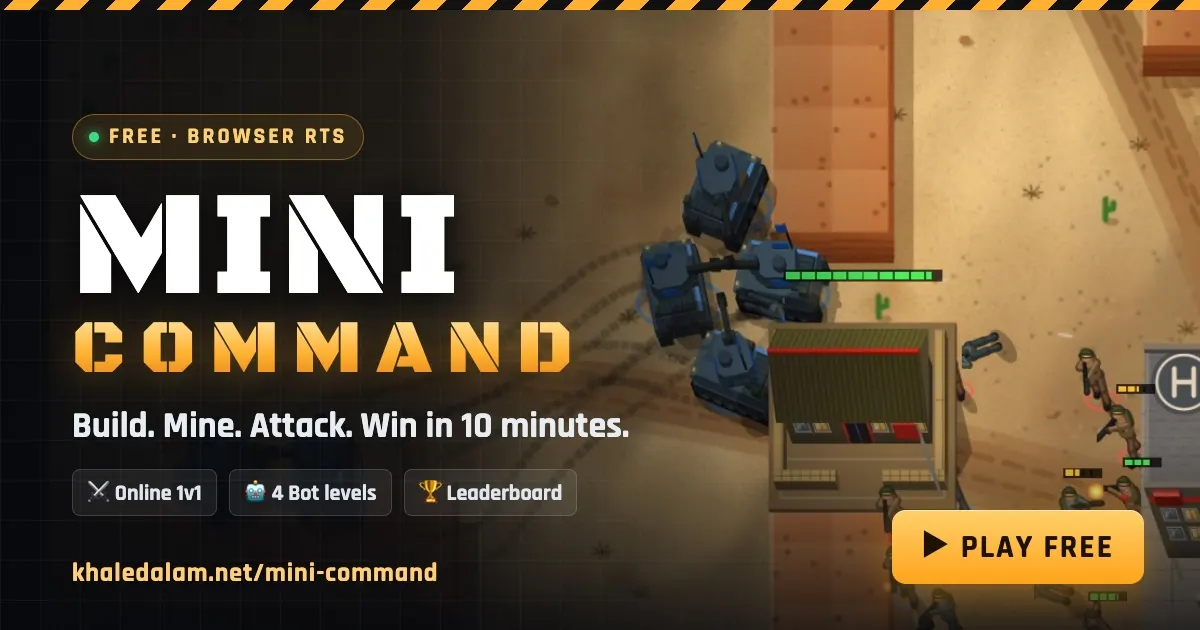
Mini Command is a free online RTS game that runs entirely in your browser: you build a base, mine gold, train soldiers and tanks, and destroy your rival's HQ in a 5–10 minute 1v1 match — no download, no account, no ads. I built it from scratch in TypeScript, and the whole thing — a 20 Hz authoritative multiplayer server, live spectating, replays, a ranked ladder and nine languages — runs on Cloudflare's free tier. This post covers both sides: how to play (and win), and exactly how it is built.
TL;DR#
- Play it now: khaledalam.net/mini-command — free, in any modern browser, desktop or laptop.
- The game: a real-time strategy duel with workers, soldiers and tanks, gold mines, veteran units, three battlefields and four bot difficulties from Easy to Brutal.
- Online features: Quick Play matchmaking, private rooms with 4-letter codes, invites, live spectating, replays, an Elo leaderboard and a daily challenge.
- The stack: TypeScript everywhere, a deterministic simulation shared by client and server, one Cloudflare Durable Object per match ticking at 20 Hz, Phaser for rendering and React for the UI.
- The art: every unit, building, tree and explosion is drawn by code at load time — there are no sprite sheets or sound files in the game.
- Languages: English, Arabic (full right-to-left), Spanish, Portuguese, French, German, Turkish, Russian and Indonesian.
What is Mini Command?#
Mini Command is a small, fast 1v1 real-time strategy game in the spirit of the classic base-building RTS games many of us grew up with — compressed into a match you can finish on a lunch break. Each player starts with a headquarters and two workers on opposite sides of the map. You spend gold to build a Barracks ($300) that trains soldiers, a Factory ($500) that builds tanks, and more workers to mine gold. The first player to destroy the enemy HQ wins.
It is deliberately small: three units, three buildings, three maps. That keeps the rules learnable in two minutes while leaving plenty of room for strategy — economy versus aggression, soldiers versus tanks, holding the rich mines in the middle or raiding your opponent's workers.
How do you play Mini Command?#
Everything works with the left mouse button (right-click is only an optional shortcut), and a new player gets an interactive coach that points at the exact button to press:
- Build a Barracks. Click Barracks in the command bar (or press 1), then click open ground near your HQ. A worker walks over and builds it.
- Mine gold. Select a worker and click a gold mine. Each trip hauls 40 gold home, on top of a steady passive income ($10 per second by default). Set your HQ's rally point on a mine and new workers start mining by themselves.
- Train an army. Click Soldier (4) a few times; a Factory unlocks Tank (5). Click again to queue more, and the ✕ on a button cancels one with a full refund.
- Attack. Press Q to select your whole army, then click the enemy HQ. Units find their own path and open fire.

Units and buildings#
- Worker ($100, 60 HP): builds structures and mines gold. Cannot fight — protect them.
- Soldier ($100, 100 HP): cheap and fast, 10 damage per second at range 5. Strong in numbers.
- Tank ($300, 400 HP): 20 damage per second at range 7, so it outranges soldiers.
- Veterancy: units that score 3 and 7 kills are promoted — they hit harder, take less damage and heal on promotion.
What strategies win in Mini Command?#
Three openings cover most games, and each one beats one of the others:
- Soldier rush (beginner): Barracks with your first $300, queue soldiers nonstop, attack at 6–8 soldiers and target workers first. It punishes greedy players but loses to early tanks, so finish fast.
- Gold boom (intermediate): train 3–4 extra workers first, rally them onto your mine, grab a contested rich mine, then spend the surplus on a Factory and a tank wave. Strongest late game, vulnerable in the first two minutes.
- Armored push (advanced): a Barracks for defense, a Factory by minute two, then 3+ tanks moving together with soldiers behind them. It crushes soldier spam, but it is slow — scout, and don't leave home empty.
Two habits matter more than any build order: focus fire (click one enemy with your whole army, because dead units stop shooting) and never float money (unspent gold is wasted — keep every building producing).

Can you play Mini Command online with friends?#
Yes. Quick Play drops you into an open room or opens one for the next player. You can also create a private room and send a friend its 4-letter code or link, or invite anyone from the list of players who are online right now. If nobody shows up within 20 seconds, the lobby offers a bot match on the same map instead of an empty waiting screen.
Other online features:
- Ranked ladder: sign in with Google or email to get a verified name and an Elo rating (everyone starts at 1000).
- Live spectating: watch any public battle as it happens, with both sides revealed.
- Replays: every online match is recorded and can be rewatched at up to 8× speed.
- Daily challenge: one scenario per day — a map, a bot level and an economy twist such as "$500 start against a Hard bot" — with a leaderboard for the fastest win.
- Career: earn XP, climb the ranks and unlock medals.
How is Mini Command built?#
The project is a TypeScript monorepo with three packages: shared (the game rules and simulation), server (Cloudflare Workers and Durable Objects) and client (React menus and a Phaser battlefield). The single most important decision was making the simulation deterministic and shared: the exact same code runs on the server for online games and in the browser for bot games.
A deterministic simulation#
The simulation is pure TypeScript with no I/O. Every player action — move, attack, build, train, mine — is a Command that the simulation validates before applying. The server never trusts the client's money, positions or damage; the client only sends intentions:
export type Command =
  | { type: 'MOVE_UNIT'; ids: number[]; x: number; y: number }
  | { type: 'ATTACK_UNIT'; ids: number[]; target: number }
  | { type: 'BUILD'; ids: number[]; building: BuildingKind; tx: number; ty: number }
  | { type: 'PRODUCE_UNIT'; building: number; unit: UnitKind }
  | { type: 'MINE'; ids: number[]; mine: number };
The computer opponents follow the same rule: the bots act only through applyCommand, exactly like a human player, so they play by the same rules as you. An automated test plays whole AI-versus-AI games on every map from both sides to prove the difficulty ladder holds: Brutal beats Hard, Hard beats Normal, Normal beats Easy.
One Durable Object per match, ticking at 20 Hz#
Each online room is a Cloudflare Durable Object: a single-threaded, stateful instance that both players connect to over WebSockets. It runs the simulation 20 times a second and broadcasts a state snapshot 10 times a second. The loop catches up on missed ticks so game speed never depends on timer jitter (simplified):
private async loop() {
  // Catch up on missed ticks, capped so a long stall can't freeze the object.
  const due = Math.floor((Date.now() - this.matchStart) / TICK_MS);
  let steps = 0;
  while (sim.tick < due && steps < 5 && !sim.result) {
    sim.step();
    steps++;
    if (sim.tick % SNAPSHOT_EVERY_TICKS === 0) this.broadcastState();
  }
}
On the client, units don't jump between snapshots: the renderer draws the world 120 ms in the past and interpolates between the two surrounding snapshots, so movement stays smooth even on a jittery connection. Other Durable Objects handle the lobby and presence list, player accounts (passwords hashed with PBKDF2), the replay archive and anonymous metrics — all using the SQLite storage that Durable Objects provide on the free plan.
Procedural art: no image files#
Every tank, soldier, building, tree, gold mine and explosion is drawn by code when the game loads: simple 3D shapes lit by a sun from the north-west, rendered into sprite atlases (32 directions for tank hulls and turrets, 8 for infantry), with painted terrain, roads, water ripples, weather, drifting clouds and tread marks. That keeps the download small and made it easy to iterate on the look without an art pipeline.
Performance on old machines#
I tested with the CPU throttled 6× and 20× in Chrome: the game held 60 fps and about 55 fps respectively, and memory stayed flat across ten matches in a row. An Auto graphics mode drops decorative effects (post-processing, clouds, weather, swaying trees) if the frame rate stays low, and the build targets browsers as old as Chrome 64 and Safari 12.
Nine languages, including right-to-left Arabic#
Every string in the UI is keyed by its English text and translated into Arabic, Spanish, Portuguese, French, German, Turkish, Russian and Indonesian. Each language is a separate chunk loaded only when chosen, Arabic switches the whole layout to right-to-left, and each language also has its own static, search-friendly page — for example the Spanish and Arabic guides.

How much does it cost to run?#
Right now, nothing: the game, the multiplayer server and the storage all run on Cloudflare's free Workers plan. The static client is served as Workers Static Assets, and outgoing WebSocket messages are free. The real limit is Durable Object duration — roughly 160 ten-minute online matches per day on the free tier — so the server's own monitoring posts a warning to Slack at 70% and 90% of that budget. Moving to the $5/month paid plan lifts it to thousands of matches a day.
Monitoring runs on cron triggers every ten minutes (health checks, deploy detection, traffic spikes) plus an external uptime check from GitHub Actions, and players' browsers report crashes anonymously so bugs show up before anyone emails about them.
Frequently asked questions#
Is Mini Command free?#
Yes. No ads, no purchases and no download. It runs in any modern browser.
Do I need an account to play?#
No. Play as a guest with any callsign. Registering (email or Google) gives you a verified name, a leaderboard rating and a career that follows you between devices.
Can I play Mini Command on my phone?#
Touch works, but the game is designed for a mouse and a bigger screen. A laptop or desktop is best.
Does it work offline?#
Battles against the computer run entirely in your browser, so once the page has loaded they work without a connection.
How do I play with a friend?#
Click Create Online Room, choose Private, and send your friend the 4-letter code or the link — or invite them from the Players tab while they're online.
Where can I find other players?#
Join the Mini Command Discord to find opponents, share replays and suggest features, or follow the Telegram channel for updates.
Key takeaways#
- A complete online RTS — matchmaking, spectating, replays, rankings — can run on a free serverless tier when each match is one Durable Object.
- Sharing one deterministic simulation between server and browser gives you cheat-resistant multiplayer and offline bot games from the same code.
- Procedural art keeps the download small and the look consistent without an art pipeline.
- Small scope (three units, three buildings, three maps) makes a strategy game learnable in two minutes without making it shallow.
Try it now at khaledalam.net/mini-command — beat the Brutal bot, take today's daily challenge, and tell me in the comments which feature you want next.
Comments
No comments yet — be the first.